



Bioprocess SCADA Software
AbioExpert™ Bioprocess SCADA Software
Applitech’s AbioExpert is an advanced software platform designed for industrial biotechnology and biopharmaceutical applications. The suite provides process monitoring, data acquisition, and control capabilities for Applitech’s bench-scale and stainless-steel pilot and GMP bioreactor systems. It can also integrate and collect data from online or offline analytical instruments, including metabolite analyzers, Raman probes, capacitance probes, etc.
AbioExpert is also fully compatible with Applikon’s my-Control, ez-Control, and ez2-Control bioreactor platforms, providing a flexible solution for both new and existing installations. To meet diverse applications and compliance requirements, the AbioExpert software family is available in four versions: Lite, Standard, Advanced, and GMP.
- Centralized data management and information sharing across departments and multiple sites
- Accelerated process development and production scale-up
- Improved operational efficiency and reduced engineering costs
- Open connectivity with bioreactors, analyzers, and process equipment from multiple vendors
- Scalable architecture to support growing process and compliance requirements
- 21 CFR Part 11 Compliance — Multi-level security controls, audit trails, electronic signatures, and comprehensive event logging support regulatory compliance requirements.
- User Access Management — Password protection, configurable user groups, role-based permissions, and controlled access to critical functions.
- OPC Connectivity — Built on an OPC architecture for seamless communication with process equipment and enhanced control of critical process parameters.
- Intuitive User Interface — A modern, user-friendly interface provides rapid access to trends, alarms, samples, reports, and system configuration, simplifying daily operation and reducing training requirements.
- Flexible Configuration — Supports multiple device connections, customizable data acquisition channels, alarm strategies, response actions, and communication protocols for maximum system flexibility.
- Multi-Device Integration — Simultaneously collect, manage, and analyze data from bioreactors, online analyzers, and auxiliary process equipment within a single software environment.
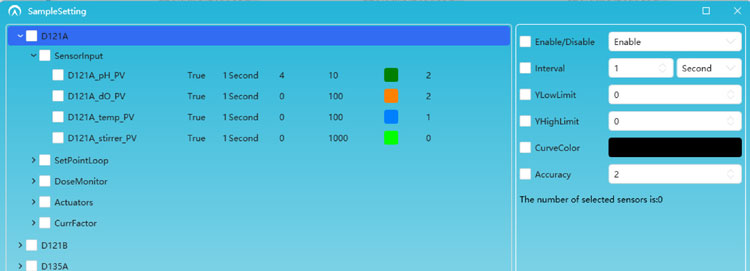

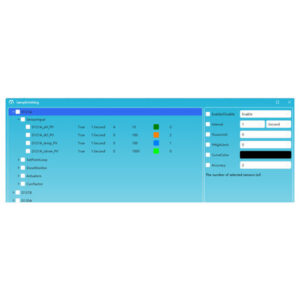
As bioprocess SCADA software, AbioExpert provides comprehensive data acquisition, monitoring, and historian capabilities to ensure secure, reliable, and traceable process data management. The platform supports high-integrity data collection, long-term storage, advanced search functions, and seamless report generation.
Key features include:
- Centralized storage of process, alarm, and audit data
- Secure data recording with complete traceability
- Automated report generation and data export
- Historical trend analysis and batch comparison
- Comprehensive system, alarm, and operator activity logs
- Export of data and configurations for reporting and analysis
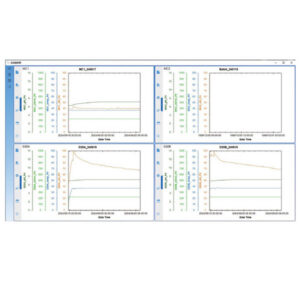
The bioprocess SCADA software includes powerful charting tools that enable users to visualize and analyze process performance in real time or retrospectively.
Features include:
- Real-time and historical trend visualization
- Multi-batch comparison synchronized by process timeline
- Zoom, pan, stretch, and capture chart functions
- Customizable curve styles and time ranges
- Flexible display and hiding of process parameters
- User-defined charts and graph templates
- Simultaneous monitoring of critical process variables
- Individual or batch adjustment of process setpoints
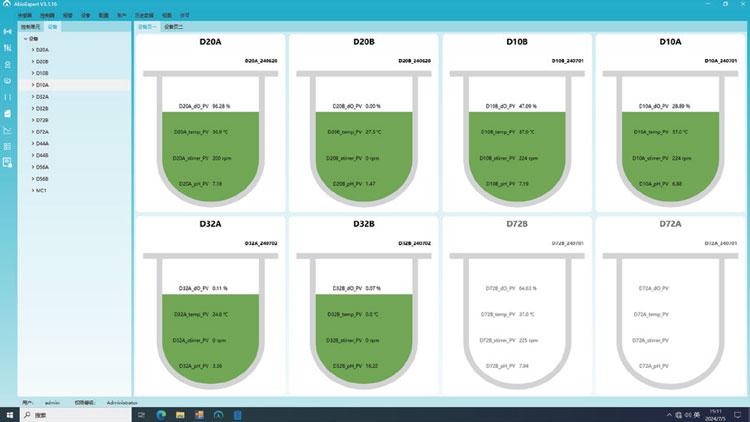
The intuitive monitoring dashboard allows operators to quickly access any connected process unit and view all relevant information from a single screen.
Capabilities include:
- Monitoring of up to 16 process units simultaneously
- Customizable display layouts
- Rapid navigation between process modules
- Real-time access to trends, alarms, recipes, samples, and batch information
- Centralized supervision of multiple bioreactors and process systems
The integrated calculation engine enables real-time computation of critical bioprocess parameters and derived variables that cannot be directly measured.
Functions include:
- Online calculations using process and laboratory data
- Derived parameter generation
- Process performance calculations
- Logical relationships between variables
- Support for advanced process monitoring and optimization strategies
AbioExpert includes a powerful recipe development environment that enables users to create sophisticated process control strategies without programming expertise.
The graphical drag-and-drop interface guides users through recipe creation from start to finish and supports:
- Automated setpoint adjustments based on process conditions and time
- Sequential and parallel process execution
- Conditional logic and branching
- Loop, wait, skip, and event-driven actions
- Batch automation and recipe standardization
- Rapid deployment of repeatable manufacturing processes
No coding is required, allowing scientists and engineers to quickly implement advanced automation strategies while maintaining process consistency and reproducibility.
| Feature | AbioPIMS Lite / AbioExpert Lite | AbioPIMS Standard / AbioExpert Standard | AbioPIMS Advanced / AbioExpert Advanced | AbioPIMS GMP / AbioExpert GMP |
|---|---|---|---|---|
| GENERAL | ||||
| User interface languages | AbioPIMS: Chinese, English; AbioExpert: English | |||
| Operating system | AbioPIMS: Windows 10 64-bit; AbioExpert: Windows 7 or later, 64-bit | |||
| Communication drivers included | m-Control, e-Control, eDual-Control, p-Control; my-Control, ez-Control, ez2-Control | |||
| Optional drivers for analytical instruments | No | No | AbioExpert: Nova Flex2, Kaiser and more | |
| Number of supported process units | AbioPIMS: up to 24 units; AbioExpert: up to 16 units | |||
| Measurement of process values from controllers | Yes | Yes | Yes | Yes |
| Control of process setpoints in process controllers | No | Yes | Yes | Yes |
| Starting and stopping of control loops | No | Yes | Yes | Yes |
| Programming of local process controllers | No | No | Yes | Yes |
| Reading of calibration data | No | No | Yes | Yes |
| Automatic report generation | No | Yes | Yes | Yes |
| 21 CFR Part 11 compliant | No | Optional | Optional | Yes |
| GAMP5 compliant | Yes | Yes | Yes | Yes |
| ISA S88 standard | Yes | Yes | Yes | Yes |
| Password protection | No | Yes | Yes | Yes |
| User definable access rights | No | Yes | Yes | Yes |
| Remote Access | No | Optional | Yes | Yes |
| Process value alarms | Yes | Yes | Yes | Yes |
| Process value simulation | Yes | Yes | Yes | Yes |
| OPC UA/DA client | AbioPIMS: UA/DA; AbioExpert: UA | |||
| Auto start after power failure | Yes | Yes | Yes | Yes |
| DATA MANAGEMENT | ||||
| Database management | AbioPIMS: Microsoft SQL/MongoDB; AbioExpert: MySQL | |||
| Minimum sampling frequency | 1 s | 1 s | 1 s | 1 s |
| Sample frequency selectable per parameter | Yes | Yes | Yes | Yes |
| On line data collection | Yes | Yes | Yes | Yes |
| Off line data collection | Yes | Yes | Yes | Yes |
| Data export to Excel | Yes | Yes | Yes | Yes |
| Data export in ASCII format | Yes | Yes | Yes | Yes |
| Graph export in graphics format | Yes | Yes | Yes | Yes |
| On-line calculations using on-line and off-line data | No | Yes | Yes | Yes |
| Configuration management | No | Yes | Yes | Yes |
| Sample data management | No | Yes | Yes | Yes |
| DATA DISPLAY | ||||
| Line graphs | Yes | Yes | Yes | Yes |
| Maximum number of y-axes per graph | AbioPIMS: 6 y-axes; AbioExpert: 8 y-axes | |||
| Procedure flow chart | No | Yes | Yes | Yes |
| Combination of current and historic data in graphs | Yes | Yes | Yes | Yes |
| Combination of different active batches in graphs | Yes | Yes | Yes | Yes |
| Measured data table display | Yes | Yes | Yes | Yes |
| Scatter plots | Yes | Yes | Yes | Yes |
| Storage of predefined graph settings | Yes | Yes | Yes | Yes |
| SUPERVISORY CONTROL | ||||
| Programming of time based actions | No | No | Yes | Yes |
| Programming of event based actions | No | No | Yes | Yes |
| Manual setting of local control setpoints | No | Yes | Yes | Yes |
| Recipe definition | No | No | Yes | Yes |
| OTHER | ||||
| Event viewer for system comments | Yes | Yes | Yes | Yes |
| Audit trail | No | Optional | Optional | Yes |
| Validation support | No | Optional | Optional | Yes |
| Service & support package | 1st year | |||
Description
AbioExpert™ Bioprocess SCADA Software
Contact Us
ProAnalytics
333 US Highway 46 West
Suite 201
Fairfield, NJ 07004
ProAnalytics Boston
100 Cummings Center
Suite 434D
Beverly, MA 01915
Phone: (973) 241-1314
Fax: (862) 772-0445
Email: info@pro-analytics.net